
Link Integration
With the Link Integration the merchant uses a link for payment creation. The link can be
enhanced with posted or encrypted information about the transaction, which are used to customize
the generated default mPAY24 PayPage for the transaction (by e.g. pre-fill an order id or a
transaction price).
Upon opening the payment link, the customer is redirected to the mPAY24 PayPage and is
provided with input forms for his payment credentials. Afterwards the merchant is informed
about the result of the transaction (e.g. success).
The merchant does not have to deal with payment system specifics and offers the customer a
consistent user experience with various payment systems.
The Link Integration does not use the mPAY24 SOAP or HTTP interface and a restricted style
customization is only possible by contacting the mPAY24 support.
Please contact the mPAY24 Support for configuration of the Link Integration.
Integration steps
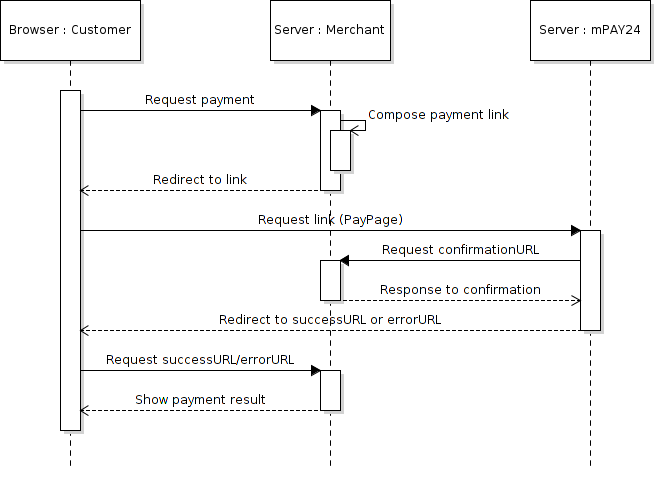
Workflow diagram of the Link Integration variant
- The customer requests a payment (e.g. by pressing a
Checkoutbutton). Alternative, the
link could be precomposed and printed on e.g. an invoice.
amount: 1.00 EUR
order id: example order
customer: John Doe- The merchant composes the payment link as described in chapter Link composition.
https://test.mpay24.com/app/bin/checkout/99999/53616c7465645f5f3a9cf49184cf52321435ea5157cc77baa7a6b6b69944b7e1b385a16a3f63fab4d7421658a512eb8cd5209f7e84b34dcd21fb7cec7beeaf3708c822bac23866f693514f54e5122130- The customer is redirected to the composed link by the merchant (e.g. by supplying the link as a text link, a QR code or just forwarding the browser to the URL).
- The customer follows the payment process specified by mPAY24.
- mPAY24 communicates the payment result via the push method using the
confirmationURL
(see chapter Payment notification for more information).
https://www.hotelmuster.com/confirmation.php?OPERATION=CONFIRMATION&TID=example+order&STATUS=RESERVED&PRICE=100&CURRENCY=EUR&P_TYPE=CC&BRAND=VISA&MPAYTID=1682984&USER_FIELD=&ORDERDESC=Example+order&CUSTOMER=John+Doe&CUSTOMER_EMAIL=&LANGUAGE=EN&CUSTOMER_ID=&PROFILE_STATUS=IGNORED&FILTER_STATUS=OK&APPR_CODE=%2Dtest%2D
TheconfirmationURLneeds to be set in the merchant portal,
if it is not provided within the link data.
- The merchant confirms the receipt of the transaction notification with either
OKor
ERROR(status depends if the confirmation could successfully update the merchant's system).
InPHPthis could be achieved byecho 'OK'
- mPAY24 forwards the customer to the
successURLorerrorURLspecified by the merchant
dynamically within the MDXI XML or static over the merchant portal. - The customer requests the
successURLorerrorURL. - (optional) If the payment notification upon the
confirmationURLhas not been received
yet, the merchant should initiate aTransactionStatuscall using thetidto
determine the transaction status (see chapter Payment notification
for more information). To initiate aTransactionStatuseither the SOAP or HTTP interface
has to be used.
Never rely on the parameters provided by thesuccessURLorerrorURL
alone, since they can be manipulated!
<SOAP-ENV:Envelope
  xmlns:SOAP-ENV="http://schemas.xmlsoap.org/soap/envelope/"
  xmlns:etp="https://www.mpay24.com/soap/etp/1.5/ETP.wsdl">
  <SOAP-ENV:Header/>
  <SOAP-ENV:Body>
    <etp:TransactionStatus>
      <merchantID>90000</merchantID>
      <tid>order example</tid>
    </etp:TransactionStatus>
  </SOAP-ENV:Body>
</SOAP-ENV:Envelope>
This step is only possible if an unqiuetidis used for each transaction (see chapter Payment notification for more information).
- The merchant informs the customer about the transaction by returning/showing him the
successURLorerrorURL.
Link composition
On account configuration, the merchant received a basic mPAY24 merchant URL, which can be used
for link composition by the Link Integration.
A payment link consists of two elements:
- the base URL
- encrypted additional data (at least
AMOUNTandTID)
The base URL is received on account creation by the merchant as well as the encryption
password. The complete additional data block, such as AMOUNT=1.00&TID=example+order, need
to be encrypted with AES-256 and CBC mode (see chapter Data encryption).
The complete payment link is composed by attaching the encrypted additional data to the
base URL. Upon opening the payment link all attached additional data are shown or rather
pre-filled on the mPAY24 PayPage.
Data encryption
The additional data have to be encrypted by AES with a 256 key in CBC (Cipher Block Chaining) mode.
Note: The mPAY24 Support provides a PHP api for simple usage of the Link Integration
with an already implemented encryption module.
Example
The following data should be encrypted and attached to the base URL to create a payment link:
AMOUNT=100&TID=example+order&CURRENCY=EUR&NAME=John+DoeThe data is saved in the t.txt file, which allows to encrypt the data via the openssl
command. The encryption password received upon account creation by mPAY24 is used here.
echo "AMOUNT=100&CURRENCY=EUR&TID=example order&NAME=John Doe" | tr -d '\n' |
openssl enc -aes-256-cbc -e | hexdump -ve '1/1 "%02x"'
enter aes-256-cbc encryption password:
Verifying - enter aes-256-cbc encryption password:
53616c7465645f5f3a9cf49184cf52321435ea5157cc77baa7a6b6b69944b7e1b385a16a3f63fab4d7421658a512eb8cd5209f7e84b34dcd21fb7cec7beeaf3708c822bac23866f693514f54e5122130
To finish the link composition, the last two lines of the openssl command should be
attached to the base URL:
Base-URL: https://test.mpay24.com/99999
Encrypted Parameters: 53616c7465645f5f3a9cf49184cf52321435ea5157cc77baa7a6b6b69944b7e1b385a16a3f63fab4d
7421658a512eb8cd5209f7e84b34dcd21fb7cec7beeaf3708c822bac23866f693514f54e5122130
https://test.mpay24.com/app/bin/checkout/99999/53616c7465645f5f3a9cf49184cf52321435ea5157cc77baa7a6b6b69944b7e1b385a16a3f63fab4d7421658a512eb8cd5209f7e84b34dcd21fb7cec7beeaf3708c822bac23866f693514f54e5122130QR code usage
To obtain a good readable QR code, it is recommanded to attach as little additional
data as possible to the payment link. Also, no customer specific data should be used unless the QR code is composed for only one person.
The mPAY24 Support provides a PHP api for simple usage of the Link Integration
including the creation of a QR code for a payment link.
The minimum fields to provide are AMOUNT and TID, therefore the
following payment link example and QR code is provided with only these information:
AMOUNT=1.00&TID=example+order
After encryption as described in chapter Data encryption and assembling
the link, the complete payment link looks like the following:
https://test.mpay24.com/app/bin/checkout/99999/53616c7465645f5f18a722fb4f9cd5d98b207cf2190d91dbdb5d6b4765716afaa3fd8c852c41bc3fd29efde5bc549f27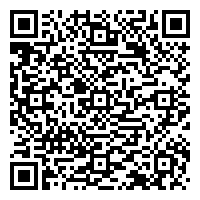
mPAY24 PayPage session and idle timeouts
The mPAY24 PayPage is configured for a total session timeout of 30 minutes. The session idle timeout is set to 15 minutes. If one of these timeouts is exceeded, the session is terminated and the payment should be restarted.
Notifications for successful payments could occur even if the session is expired. In such case the customer is returned to the successURL.
Updated 12 months ago